在 EKS 上用 Ray Train DLC 和 EFA 做分布式训练
Distributed training with Ray Train DLCs and EFA on EKS
AWS 发布 Ray Train 深度学习容器(DLC),把 Ray 2.58.0、PyTorch 2.13.0、CUDA 13.0.2、NCCL 2.29.7 与 EFA 网络栈打包成同一镜像,用户无需自建即可在 EKS 上做分布式训练。
What usually stops PyTorch training from scaling out to a cluster is the container, not the model code. Every container needs the same CUDA runtime, a PyTorch build compiled against it, NCCL (NVIDIA Collective Communications Library), the Elastic Fabric Adapter (EFA) userspace libraries, the AWS OFI NCCL plugin that connects NCCL to EFA, and a Ray version the cluster operator agrees with. Building that image and rebuilding it each time one of those pieces moves is a project of its own, and it has nothing to do with the model you set out to train. The Ray Train Deep Learning Container (DLC) is that image, built by AWS. AWS assembles the stack, tests it as one unit, publishes it in Amazon Elastic Container Registry (Amazon ECR) Public and keeps it patched.
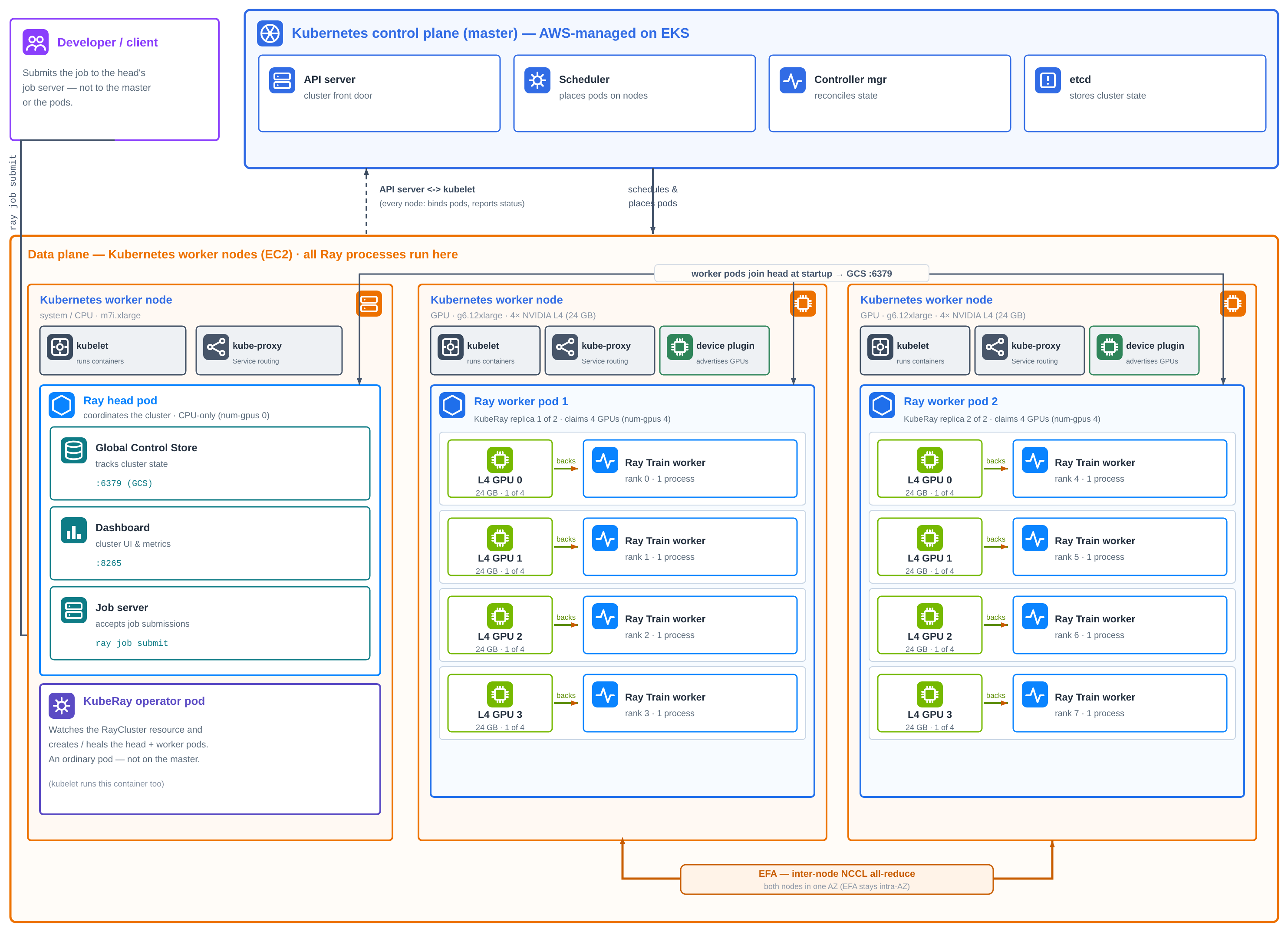
Figure 1: One EKS cluster with a control plane managed by AWS, a CPU system node (m7i.xlarge) running the KubeRay operator and Ray head, and two EFA-enabled g6.12xlarge nodes in one Availability Zone. KubeRay builds it from one RayCluster manifest, Ray Train places eight workers, one per GPU, and inter-node collectives cross over EFA.
Ray runs a job across machines as a single cluster with two roles. The Ray head coordinates and runs the global control store that tracks cluster state, the dashboard and job server you submit jobs to. Ray worker nodes supply the GPUs and run the training processes. Each worker joins the cluster by connecting to the head’s address when it starts. On Kubernetes, each of these is a pod. Kubernetes has no built-in idea of a Ray cluster, so something must create the head and worker pods, start Ray in the right role in each, point the workers at the head, and replace pods that fail. KubeRay does this. It’s an open source Kubernetes operator that adds a RayCluster resource: you describe a head group and a worker group in one manifest, and KubeRay builds and maintains the cluster from it.
A single tagged image runs as both the Ray head and the Ray workers, whether KubeRay starts it on Amazon Elastic Kubernetes Service (Amazon EKS) or you start it yourself on Amazon Elastic Compute Cloud (Amazon EC2). What you add is configuration: which instances, how many GPUs each pod gets, which network transport NCCL uses, and which extra Python packages a job needs. All of it is set from outside the image.
This post walks through a sample that uses the DLC exactly as published to fine-tune Qwen2.5-1.5B with PyTorch Fully Sharded Data Parallel (FSDP) across eight NVIDIA L4 GPUs on two g6.12xlarge instances. The training code is one function, the cluster is one RayCluster manifest plus a file of variables, and no image is built at any point. Because the DLC already carries the EFA stack, collectives between the two instances run over the EFA as soon as the pods request it. The entire solution is in this sample repository, and it uses the same KubeRay-on-EKS foundation as our multi-node Ray Serve walkthrough.
What you get without building anything
The Ray Train DLC is the PyTorch training image with Ray’s training libraries on top. The tag this sample pulls, public.ecr.aws/deep-learning-containers/ray:train-ml-cuda-v1.1, replaces a build that would otherwise look like this:
| Layer | What you would otherwise build and keep aligned | In the Ray Train DLC |
| Distributed runtime | Ray with the dashboard and job server, at a version KubeRay supports | Ray 2.58.0 with Train, Tune and Data |
| Framework | PyTorch compiled for your CUDA version | PyTorch 2.13.0, torchvision 0.28.0 |
| GPU runtime | CUDA, cuDNN and NCCL releases that agree with each other | CUDA 13.0.2, cuDNN, NCCL 2.29.7 |
| Networking | EFA installer, libfabric and aws-ofi-nccl, built against that NCCL |
EFA latest, AWS OFI NCCL plugin, GDRCopy |
| Training libraries | DeepSpeed, flash-attn and Transformer Engine compiled for your CUDA | DeepSpeed, flash-attn, Transformer Engine, PyTorch Lightning, Hugging Face libraries |
| Diagnostics | NCCL tests built from source | all_reduce_perf already on the path |
The networking row is the one most teams would least like to own. A mismatch there doesn’t produce an error. NCCL drops to TCP sockets, and the job runs to completion at a fraction of the speed. In the DLC, those libraries are built and tested together, and AWS gates each release on multi-node EFA and multi-node KubeRay training tests, which are exactly the paths this sample uses.
A few more properties remove work that you would otherwise do per cluster:
- No registry setup – The image is public, so nodes pull it without credentials and nothing is built or pushed on the way.
- No driver matching – On startup the entrypoint checks the host’s NVIDIA driver and, if it is older than the image’s CUDA, turns on the bundled CUDA forward-compatibility libraries automatically.
- No head-versus-worker images – The image has no fixed role. Whatever starts the container supplies the
ray startcommand, so one tag serves every pod. - No separate inference image family – Ray Train shares the
rayECR repository with the Ray Serve DLC and Ray LLM DLCs, under thetrain-mltag prefix.
Configure it, don’t rebuild it
Everything that differs between one training job and the next is set around the image. The sample uses each of these mechanisms:
| What you control | How you set it | In this sample |
| Head or worker role | KubeRay rayStartParams per pod group |
Same DLC_IMAGE for both. Head runs with num-gpus: "0" |
| GPUs and EFA per pod | Kubernetes resource requests | nvidia.com/gpu: 4, vpc.amazonaws.com/efa: 1 |
| Network transport | Environment variables on the pod or the job | FI_PROVIDER, NCCL_NET_PLUGIN, NCCL_SOCKET_IFNAME, NCCL_DEBUG |
| Extra Python packages | Ray runtime_env at submit time |
Any package a job needs, installed at submit time |
| Image version | Versioned or digest-pinned tag in DLC_IMAGE |
train-ml-cuda-v1.1 |
| Cluster shape | Variables in scripts/env.sh |
Instance type, node count, GPUs per node, Region, AZ |
| Training job | Arguments to train.py |
Model, steps, sequence length, batch size |
Packages per job. The image ships the HuggingFace training stack, so this sample’s job needs nothing added. When an experiment does need a library the image does not carry, Ray installs it for that job at submit time through runtime_env and the image is unchanged. No new image, no new tag.
Transport per job. The image defaults to FI_PROVIDER=efa, and its NCCL configuration excludes the loopback and Docker bridge interfaces. On EKS you point NCCL_SOCKET_IFNAME at the pod’s eth0. The sample sets all four networking variables in the manifest anyway, so the behavior is visible in one file and doesn’t depend on image defaults. Because these are plain environment variables, a single job can override them through its runtime_env.
Versions you choose. The sample pins train-ml-cuda-v1.1, the current minor release, so a cluster is reproducible from one run to the next. The vX.Y tags move with security rebuilds. The fully qualified vX.Y.Z tags stay frozen at the original release build, so pin a digest when you need a byte-identical run. The same image is also available from private ECR URIs.
How the cluster is laid out
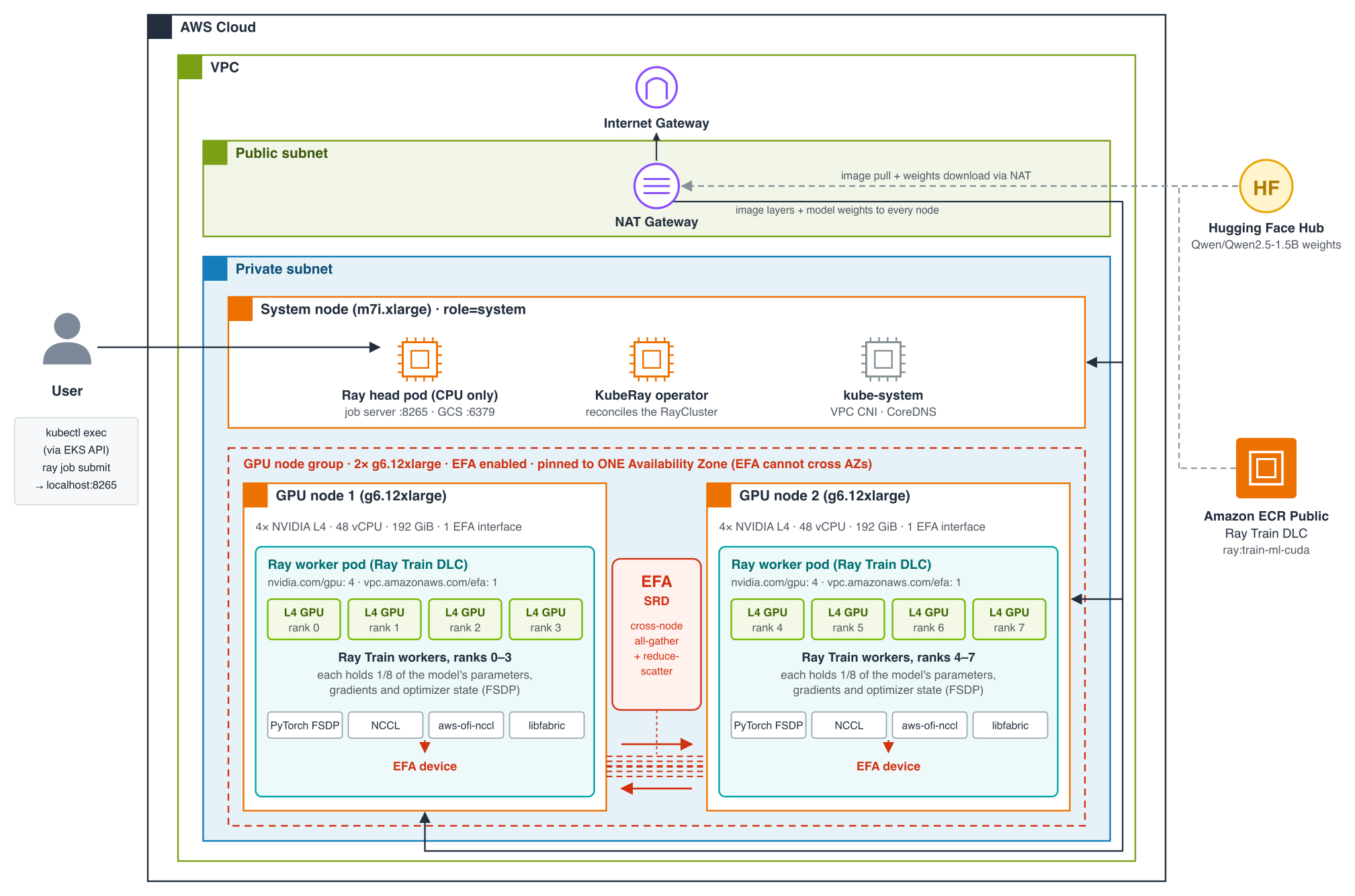
Figure 2: The sample’s cluster. Every pod runs the same Ray Train DLC from Amazon ECR Public. The CPU system node runs the KubeRay operator and a Ray head with no GPUs. Each EFA-enabled g6.12xlarge, both in one Availability Zone, runs a single four-GPU Ray worker pod.
All nodes sit in private subnets of one virtual private cloud (VPC) and reach the internet only through a NAT Gateway, which is how every node pulls the DLC from Amazon ECR Public and how workers download model weights from Hugging Face. One m7i.xlarge forms the system node group, hosting kube-system add-ons, the KubeRay operator and the Ray head. The head runs the job server on port 8265 and Ray’s control store on 6379, and it advertises no GPUs, so no training work lands on it. Jobs are submitted from inside the head pod with kubectl exec, through the EKS API, so port 8265 is never exposed outside the cluster.
Training runs on two g6.12xlarge instances, each with four NVIDIA L4 GPUs, 48 vCPUs, 192 GiB of memory, 40 Gbps of networking and one EFA interface. Each runs one Ray worker pod that claims all four GPUs and the EFA interface, and Ray Train places four workers in each pod: ranks 0–3 on one instance, 4–7 on the other. Because EFA traffic doesn’t cross Availability Zones, the scripts place both instances in a single zone that has been checked to offer g6.12xlarge.
What Ray Train does inside the container
The DLC provides the stack. Ray Train provides the part that would otherwise be launcher code. Multi-node PyTorch normally means starting a process per GPU on every host and giving each one its rank, the world size and a rendezvous address. With Ray Train you write the training loop as a function and pass it to TorchTrainer with a ScalingConfig. Ray starts one worker per GPU wherever the cluster has GPUs, forms the torch.distributed process group, and runs your function on each worker.
This sample asks Ray Train for FSDP, which splits the model’s weights, gradients and optimizer state across all eight GPUs rather than copying them to each one. Qwen2.5-1.5B in bfloat16 needs about 12 GB for those four tensors. Sharded eight ways, each L4 GPU holds roughly 1.5 GB. The price is communication: FSDP gathers each layer’s weights before using it and reduce-scatters gradients afterwards, so the whole model crosses between ranks on every step. Between the two instances, that traffic is what the DLC’s EFA stack carries.
Prerequisites
You must have the following in place before you start:
- Tools: AWS Command Line Interface (AWS CLI) v2 signed in to the target account, eksctl, kubectl, Helm, and
envsubstfrom GNU gettext. - Quota: 96 vCPUs of G-family On-Demand capacity for the two g6.12xlarge instances, in an AWS Region where at least one zone offers them. If you already hold an On-Demand Capacity Reservation for the instances, set
CAPACITY_RESERVATION_IDinstead. The scripts launch the node group into it and skip the capacity search. - Budget: about $9.50 an hour while the GPU instances are up, covering both instances, the EKS control plane and the NAT Gateway.
A quick way to confirm that the CLI is pointed at the account that you expect:
aws sts get-caller-identityThe training code: One function and a trainer
code/train.py is the whole job, and it contains nothing specific to the container, the cluster or the network. Ray runs train_func once per GPU. It asks Ray for its rank, loads the model, hands it to prepare_model for FSDP, and runs an ordinary PyTorch loop:
code/train.py — the per-GPU function (abridged)
def train_func(config):
    ctx = ray.train.get_context()
    world_size, rank = ctx.get_world_size(), ctx.get_world_rank()
    device = ray.train.torch.get_device()

    model = AutoModelForCausalLM.from_pretrained(config["model_id"], torch_dtype=torch.bfloat16)

    # Any submodule above 10M parameters becomes its own FSDP unit. Wrapping by
    # size, not by a model-specific layer class, keeps the script model-agnostic.
    auto_wrap_policy = partial(size_based_auto_wrap_policy, min_num_params=int(1e7))
    model = ray.train.torch.prepare_model(
        model,
        parallel_strategy="fsdp",
        parallel_strategy_kwargs={"auto_wrap_policy": auto_wrap_policy},
    )
    optimizer = torch.optim.AdamW(model.parameters(), lr=config["learning_rate"])

    for step in range(config["steps"]):
        input_ids = torch.randint(0, model.config.vocab_size,
            (config["batch_size"], config["seq_len"]), device=device)
        optimizer.zero_grad()
        loss = model(input_ids=input_ids, labels=input_ids).loss
        loss.backward()  # parameters gathered again, gradients reduce-scattered
        optimizer.step()  # local: each rank updates only its own slice
        ray.train.report({"step": step, "loss": loss.item()})
The driver joins the running cluster, counts its GPUs and starts the trainer. Because the worker count comes from the cluster, the same script runs unchanged on one node or many:
code/train.py — the driver (abridged)
ray.init(address="auto")  # join the RayCluster
num_workers = int(ray.cluster_resources().get("GPU", 0))  # 8 here

trainer = TorchTrainer(
    train_func,
    train_loop_config={...},
    scaling_config=ScalingConfig(num_workers=num_workers, use_gpu=True),
    run_config=RunConfig(name="ray-train-fsdp-llm"),
)
result = trainer.fit()
The batches are random token IDs so that the run depends on nothing but the cluster. The sample is judged on whether real FSDP collectives crossed both nodes and the job completed. For a real fine-tune, replace the random tensor with a Ray Data or DataLoader pipeline. Nothing else in the function changes.
The manifest: The only place the DLC is configured
manifest/raycluster.yaml is where the image meets the cluster, and it is short because the image needs so little. The head’s only special setting is NVIDIA_VISIBLE_DEVICES=void, which stops the container runtime’s NVIDIA hook from failing on a node that has no GPU. The worker group holds everything else:
manifest/raycluster.yaml — worker group (abridged)
workerGroupSpecs:
  - groupName: gpu-workers
    replicas: 2
    rayStartParams:
      num-gpus: "${GPUS_PER_NODE}"  # keeps Ray's GPU count equal to the pod's
    template:
      spec:
        nodeSelector: { role: gpu-worker }
        containers:
          - name: ray-worker
            image: "${DLC_IMAGE}"  # the DLC as published; same tag as the head
            env:
              - { name: NCCL_DEBUG, value: "INFO" }  # print the chosen transport
              - { name: NCCL_SOCKET_IFNAME, value: "eth0" }  # pod network on EKS
              - { name: FI_PROVIDER, value: "efa" }  # libfabric: EFA, nothing else
              - { name: NCCL_NET_PLUGIN, value: "ofi" }  # load the AWS OFI plugin
            resources:
              limits: { nvidia.com/gpu: "${GPUS_PER_NODE}", vpc.amazonaws.com/efa: "1",
                cpu: "40", memory: 160Gi }
              requests: { nvidia.com/gpu: "${GPUS_PER_NODE}", vpc.amazonaws.com/efa: "1",
                cpu: "40", memory: 160Gi }
Read it as three decisions.
Which image: ${DLC_IMAGE}, unmodified, for both head and workers.
Which hardware: four GPUs and the node’s single EFA interface per pod. Requesting vpc.amazonaws.com/efa is what makes the EFA device plugin mount the interface into the container. Without it, NCCL can’t see EFA and falls back to sockets.
Which transport: four environment variables, so nothing is left to auto-detection.
Two smaller details keep a multi-node job stable. First, requests should equal limits, which places the workers in Kubernetes’ Guaranteed Quality of Service (QoS) class. This matters because a single throttled or evicted rank stalls the other seven. Second, num-gpus is derived from the same variable as the GPU request, so Ray’s view of capacity always matches Kubernetes’.
Bringing it up: One command for the infrastructure, then the job
Configuration lives in one place, scripts/env.sh: cluster name, Region, Kubernetes version, node types and counts, the image, pinned versions of KubeRay and both device plugins, and the training parameters. Export any of them to change it for a run. All five scripts are idempotent and safe to re-run. deploy_cluster.sh, deploy_node_group.sh, and deploy_ray_train_job.sh each prompt before creating or touching cluster resources. install_gpu_plugins.sh and install_kuberay.sh are reconcilers and run straight through.
cd training/ray-train/scripts
source ./env.sh
./deploy_all.sh – Finds where the capacity actually is, then builds the infrastructure there.
g6.12xlarge capacity shifts between Regions and Availability Zones day to day, so this is the starting point rather than a Region guessed up front in env.sh. It first runs find_gpu_capacity.sh, which checks, per candidate Region: whether g6.12xlarge is offered in each Availability Zone, whether the account’s On-Demand G/VT-family vCPU quota has room for the requested node count, and the EC2 Spot placement score as a capacity signal. With --probe, which deploy_all.sh passes by default, it gets a definitive answer by creating and immediately canceling a real Capacity Reservation in each candidate zone. It then shows the plan and asks once:
Proceed with the whole chain without further prompts? (y/N):Answering y runs, in order, deploy_cluster.sh, deploy_node_group.sh, install_gpu_plugins.sh, and install_kuberay.sh in the recommended Region, each skipping its own repeat confirmation because this one already asked (-y skips this prompt too, and --plan shows the plan without creating anything). If the GPU node group can’t launch in the best zone, the script removes it and tries the next zone the probe confirmed. GPU_AZ is also cross-checked against the cluster’s actual private subnets, not only where g6.12xlarge happens to be offered, so the GPU node group can’t end up pinned to an Availability Zone the cluster has no subnet in. The chosen Region and zone are saved to scripts/.placement.env, which every other script reads, so later commands target the same place without re-exporting anything. Together the four steps take 20 to 30 minutes on a fresh Region. An existing cluster or node group is detected and reused.
deploy_cluster.sh creates the EKS control plane, VPC, OpenID Connect (OIDC) provider, core add-ons, and the m7i.xlarge system node group, choosing subnets in zones that actually offer g6.12xlarge. deploy_node_group.sh adds the two g6.12xlarge instances with EFA turned on, labeled role=gpu-worker and nvidia.com/gpu.present=true. The second label is one that teams often overlook. Without it, the NVIDIA device plugin chart’s DaemonSet runs on zero nodes, with no error pointing at the cause. install_gpu_plugins.sh makes sure both device plugins are present. Recent eksctl bundles them into an EFA-enabled node group, so on a fresh cluster it finds them and skips. Otherwise it installs them at pinned chart versions. Either way it verifies nvidia.com/gpu and vpc.amazonaws.com/efa are allocatable on every GPU node rather than trusting a successful Helm release. install_kuberay.sh installs the KubeRay operator onto the system node, keeping it off the GPU instances.
What deploy_all.sh does not do by default is run the training job. That stays a separate step you can re-run as often as you like, because it is a real job run rather than infrastructure, and a failed job then never sends you back through cluster setup. Pass --train to chain it:
./deploy_ray_train_job.sh — the RayCluster, the job, and the checks.
Renders the manifest with envsubst and applies it. It then re-reads each GPU node’s allocatable resources before waiting on any pod: if a device plugin didn’t come up, you get a clear error here rather than a pod that sits in Pending until a timeout. Once the head is Ready and both workers are Ready, it copies code/ onto the head and, through kubectl exec, submits from inside it:
ray job submit --address http://localhost:8265 --working-dir /tmp/ray-train-code \
python3 train.py --model_id Qwen/Qwen2.5-1.5B
The submit call streams logs from all eight ranks and returns when the job does. The script then inspects which transport NCCL used and exits with an error if the job failed or EFA wasn’t in the path, which also makes it usable as a continuous integration (CI) gate. ./deploy_ray_train_job.sh status prints the RayCluster state, which instance hosts each pod, and GPU capacity. A correctly provisioned cluster looks like this:
$ kubectl get nodes -l role=gpu-worker \
-o custom-columns='NAME:.metadata.name,GPU:.status.allocatable.nvidia\.com/gpu,EFA:.status.allocatable.vpc\.amazonaws\.com/efa'
NAME               GPU   EFA
ip-192-168-70-51   4     1
ip-192-168-92-26   4     1
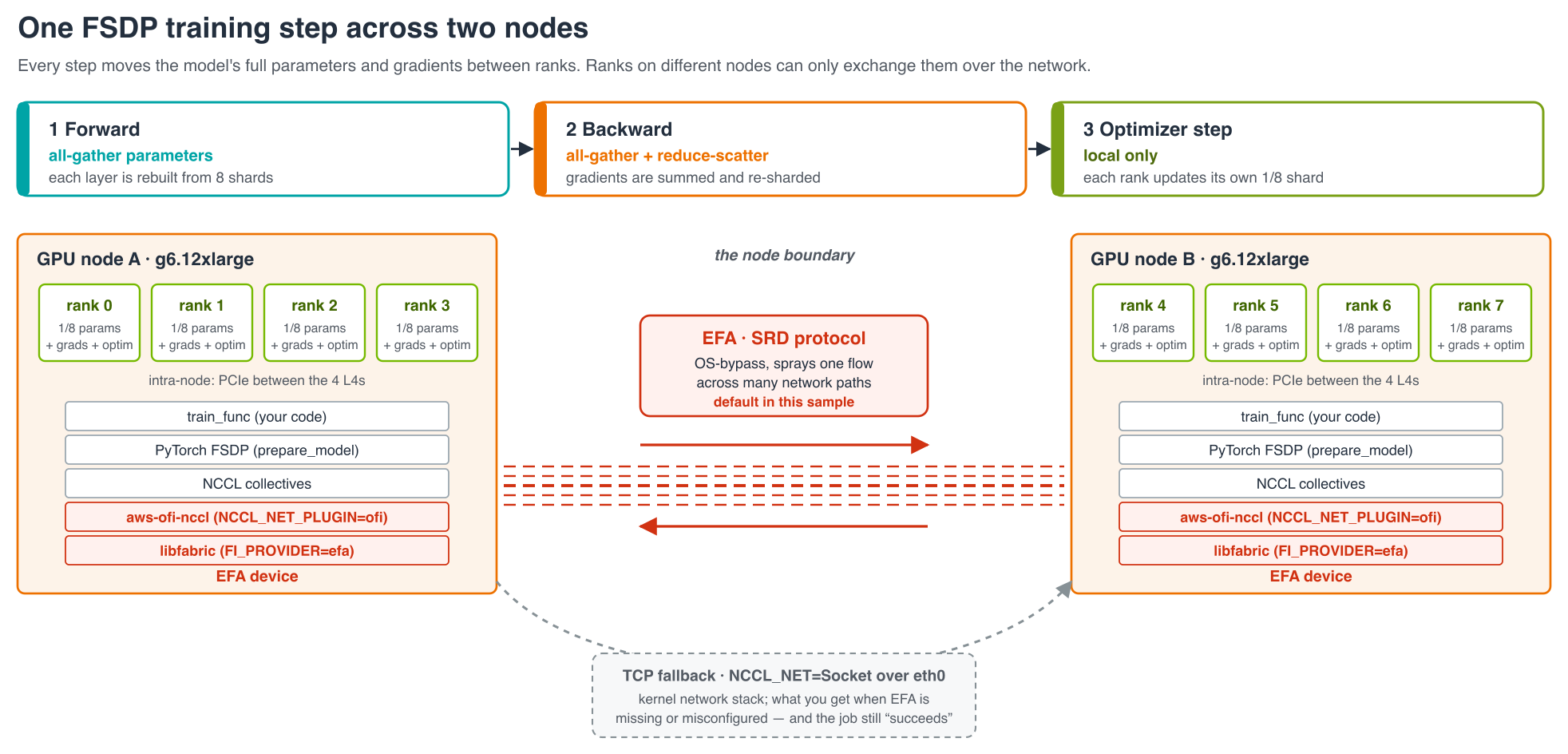
Figure 3: One FSDP step on this cluster. Weights are gathered in the forward and backward passes and gradients are reduce-scattered. Traffic between the instances takes the path the DLC ships, NCCL → AWS OFI NCCL plugin → libfabric → EFA, or falls back to TCP sockets when that path is missing.
Adapting it to your workload
Because the image is used as published and the job learns its scale from the cluster, most changes touch exactly one file:
| You want to change | Where | No changes needed to |
| The model | MODEL_ID |
Code, manifest, image |
| Steps, sequence length, batch size | STEPS, SEQ_LEN, BATCH_SIZE |
Code, manifest, image |
| The training loop itself | Body of train_func |
Trainer, manifest, image, scripts |
| An additional Python package | --runtime-env-json pip list |
Image |
| A pinned DLC release | DLC_IMAGE to a versioned tag |
Everything else |
| The GPU instance family | GPU_NODE_TYPE, GPUS_PER_NODE |
Code, image |
| How many GPU instances | GPU_NODE_COUNT, plus replicas, minReplicas and maxReplicas in the manifest |
Code (it counts the GPUs) |
| Region or zone | REGION, optionally GPU_AZ |
Everything else |
Variables in the table live in env.sh unless stated otherwise. When switching instance families, GPUS_PER_NODE has to match the hardware, and the family needs EFA support plus a place on the EFA device plugin’s list of allowed instance types. The plugin version pinned here is known to include g6.12xlarge. Moving to p5 or another GPUDirect-capable family needs no change to the image or the training code.
Tearing it down
The GPU instances are the expensive part, at around $9.50 an hour together with the control plane and NAT Gateway. Remove things in the opposite order to how they were created:
./delete_ray_train_job.sh        # RayCluster
./install_kuberay.sh cleanup     # KubeRay operator
./install_gpu_plugins.sh cleanup # NVIDIA and EFA device plugins
./delete_node_group.sh           # GPU instances
./delete_cluster.sh              # EKS cluster, VPC and system node
Where to go next
Two instances and eight GPUs ran a sharded fine-tune on EKS with a container nobody built. The Ray Train DLC supplied a tested stack from CUDA through EFA. KubeRay started it as head and workers from one tag. Ray Train placed the workers and formed the process group. Everything that varied, from hardware to transport to Python packages, was set from outside the image. The EFA path the image ships engaged with four environment variables and doubled throughput over TCP on unchanged code.
Natural next moves:
- Replace the random batches with a real dataset, and checkpoint to Amazon Simple Storage Service (Amazon S3) or Amazon FSx for Lustre.
- Pin
DLC_IMAGEto a versioned tag for reproducible runs. - Turn on
FailureConfigso long runs survive a lost instance. - Move to a larger model on a GPUDirect RDMA family such as p5. The image and code stay the same.
About the authors

Sunita Koppar
Sunita is a Senior Specialist Solutions Architect in Generative AI and Machine Learning at AWS, where she partners with customers across diverse industries to design solutions, build proof-of-concepts, and drive measurable business outcomes. Beyond her professional role, she is deeply passionate about learning and teaching Sanskrit, actively engaging with student communities to help them upskill and grow.

Kevin Wang
Kevin is a Software Development Engineer on the AWS Deep Learning Containers/AMIs team, where he builds and maintains deep learning images that customers run on Amazon Elastic Compute Cloud (Amazon EC2), Amazon SageMaker AI, and Amazon Elastic Kubernetes Service (Amazon EKS). His team manages the images and their build systems as open source on GitHub. He holds a bachelor’s degree from Peking University and a master’s degree from the University of Southern California, both in computer science.

Sukhmeet Singh
Sukhmeet is a Senior Specialist Solutions Architect in Generative AI and Machine Learning at AWS. He partners with independent software vendor (ISV) customers to design AI solutions, build proof of concept, and take them into production with measurable business results. His interests cover generative AI, Computer Vision, IoT, ML Infrastructure, and Natural Language Processing. He especially enjoys connecting these areas to solve real-world problems at scale.
来源:AWS Machine Learning Blog · aws.amazon.com