别再猜 Amazon SageMaker AI 上 TTS 的自动扩缩容目标值
Stop guessing auto scaling targets for TTS on Amazon SageMaker AI
针对 Amazon SageMaker AI 上自托管 TTS 端点扩缩容目标值靠猜的问题,文章以 8200 万参数的 Kokoro-82M 部署在 SageMaker AI 实时端点为例,用实测的 Q_max(单实例不突破 SLO 的最高并发)和 T_total(一次扩容端到端耗时)推算扩容阈值、缩容阈值与两个冷却时间。
A traffic spike hits your self-hosted text-to-speech (TTS) endpoint, and requests start queueing. Latency climbs past your service level objective (SLO) right when the most callers are listening. The auto scaling policy behind that endpoint was supposed to prevent this, but the target value it scales on was a guess, and guesses like that fail silently until real traffic proves them wrong.
Get that number wrong, and it’s paid for in one of two ways, and neither shows up as an alarm. Guess too conservative, and the fleet runs GPU instances that sit mostly idle. That cost lands on every invoice but never trips an incident report. Guess too aggressive, and the fleet carries a risk nobody sees. Each instance holds more concurrent requests than it can serve inside its latency promise. Nothing looks wrong until a real traffic spike pushes queueing time past the SLO. That happens right when the most callers are listening. That’s the hidden gap. A policy that looks fine on the console can already be failing the people it’s supposed to serve.
In this post, we deploy Kokoro-82M, an 82-million-parameter TTS model, as a custom container on an Amazon SageMaker AI real-time endpoint. AWS Cloud Development Kit (AWS CDK) stacks handle the deployment. We replace guesswork with two measurements taken against the live endpoint. Q_max is the highest concurrency one instance sustains before breaching the SLO, and T_total is how long a scale-out takes end to end. We derive the scale-out threshold, scale-in threshold, and both cooldowns from those two numbers by arithmetic. Every number in this post comes from an actual deployment and measurement run of the aws-samples repository referenced in this post.
Why default auto scaling metrics don’t work for TTS
Most public guidance on Amazon SageMaker AI auto scaling targets short synchronous request/response calls, or large language model (LLM) serving, where the natural metric is tokens generated per second. TTS synthesis fits neither pattern: a single request holds a connection open for several seconds with no token-generation loop to attach a metric to. Kokoro-82M is non-autoregressive, a StyleTTS2 derivative with an ISTFTNet decoder, trained adversarially rather than by autoregressive next-token prediction or iterative denoising. It produces a full utterance from one duration-aligned pass. There’s no generation loop to instrument with a per-token metric in the first place. What determines whether a TTS instance is overloaded is simpler than it sounds: how many requests are queued and executing on it right now.
The deployed policy scales on ConcurrentRequestsPerModel, a native metric Amazon SageMaker AI publishes itself rather than one this project’s own container code has to emit. Scaling on a metric Amazon SageMaker AI publishes removes an entire class of failure where a custom metric configuration looks correct on paper but nothing is actually publishing to it.
ConcurrentRequestsPerModel publishes a Maximum statistic over a 10-second window, a different quantity from the mean in-flight count a benchmarking client measures directly. The tooling accounts for this. At every rung of the concurrency ladder it measures both quantities against the same load and records the ratio between them. It then uses that ratio to convert the client-measured threshold into Amazon CloudWatch units before writing it into the deployable configuration. For the Kokoro-82M run in this post, the measured ratio came out to exactly 1.0 at every rung, so the client-measured and Amazon CloudWatch-reported thresholds match directly.
Solution overview
This solution deploys Kokoro-82M in a custom container on an Amazon SageMaker AI real-time endpoint, then replaces a guessed auto scaling target with one derived from two measurements taken against that live endpoint: Q_max, the concurrency ceiling one instance serves inside the SLO, and T_total, how long a real scale-out takes. A synthesis request flows through four layers: a client, the Amazon SageMaker AI endpoint, a custom container on a GPU instance behind that endpoint, and the Kokoro-82M model inside the container.
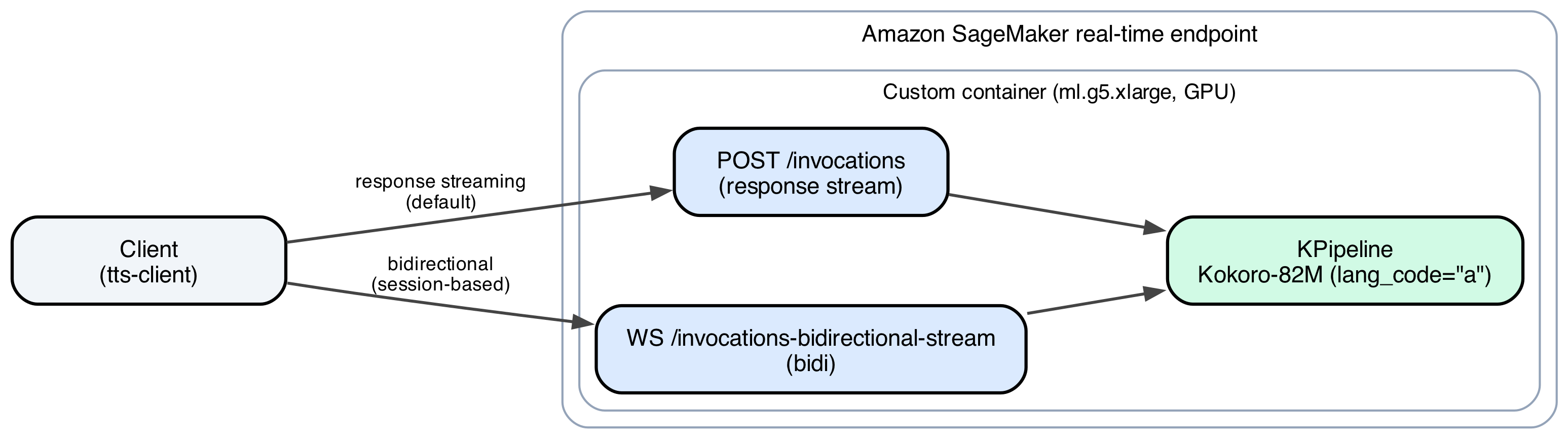
Figure 1: The Kokoro-82M request path, from client through the Amazon SageMaker AI endpoint and custom container to the model
The container supports two wire transports: response streaming (InvokeEndpointWithResponseStream), which streams audio back as it’s synthesized so playback starts before the utterance finishes, and bidirectional streaming (InvokeEndpointWithBidirectionalStream), which holds one long-lived session open for multiple messages.
Running Kokoro-82M in a custom container, rather than behind a managed inference toolkit, is what makes the rest of this post possible. A container you control can enforce its own admission limits and expose the exact concurrency signal Amazon SageMaker AI already publishes, instead of retrofitting a borrowed metric onto a workload it wasn’t built for. The AWS CDK stacks that deploy this endpoint only attach auto scaling resources once a real, measured plan exists for the model, so a guessed configuration can never reach production silently. The rest of this post is that measurement.
Prerequisites
To follow this walkthrough, you need:
- An AWS account with permissions to create AWS Identity and Access Management (IAM) roles, Amazon Simple Storage Service (Amazon S3) buckets, Amazon Elastic Container Registry (Amazon ECR) repositories, and Amazon SageMaker AI resources.
- Note: the sample container pins an earlier PyTorch with a known advisory (
PYSEC-2026-2286, fixed in torch 2.10.0). Review and upgrade the pin before any non-proof-of-value use.
- Note: the sample container pins an earlier PyTorch with a known advisory (
- AWS CDK v2, installed and bootstrapped in your target account and region.
- Python 3.11 or later, uv, and Docker to build the container image.
- A
ml.g5.xlargeservice quota with at least one spare slot above your baseline before running the scale-out measurement in this post. - The deployment code from the GitHub repository referenced in this post.
Walkthrough
By the end of this walkthrough, you will have a live Amazon SageMaker AI auto scaling policy for Kokoro-82M, derived entirely from two measurements taken against your own endpoint rather than from a guess.
Deploy the endpoint stacks
The endpoint deploys through three AWS CDK stacks, applied in order: SpeechFoundationStack creates the IAM roles and the Amazon S3 bucket that caches model weights, SpeechModelCacheStack syncs a model’s Hugging Face weights into that bucket once, and SpeechEndpointStack builds the container image, pushes it to Amazon ECR, and creates the Amazon SageMaker AI model, endpoint configuration, and endpoint.
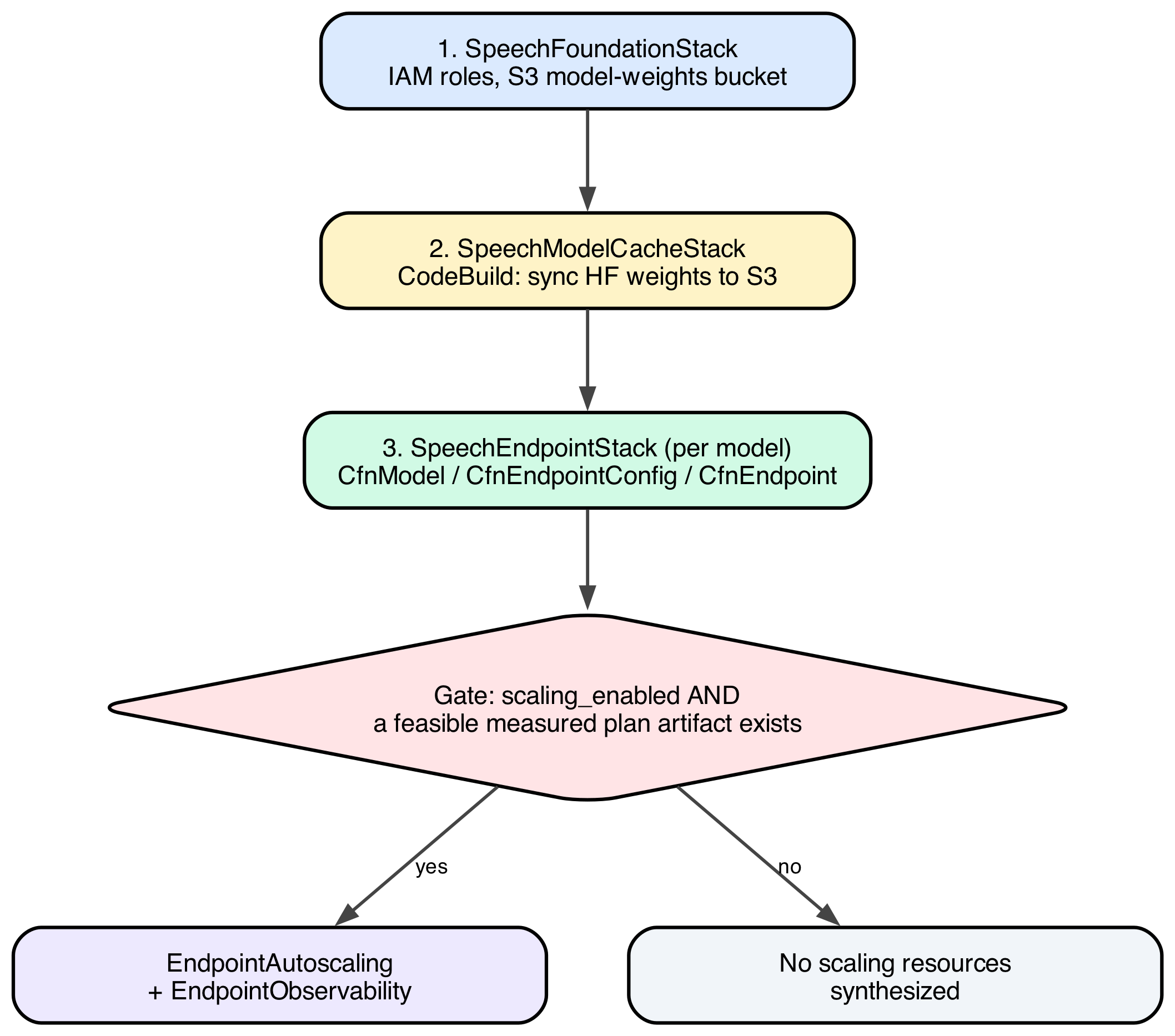
Figure 2: The three AWS CDK stacks and the gate that decides whether auto scaling resources get synthesized
The gate on the third stack keeps a default, unmeasured scaling configuration from reaching production. scaling_enabled is a static flag, true whenever max_instances is configured greater than min_instances, and it says nothing on its own about whether the numbers behind it were ever measured. The stack adds a second, independent check at synthesis time: does a real, feasible plan artifact exist for this model? Only when both conditions hold does the stack synthesize scaling resources: an EndpointAutoscaling construct that wires the scaling policy and alarms, and an EndpointObservability construct that adds the dashboards and alarms used to monitor it. A model with scaling_enabled=True but no measurement behind it gets the same no scaling resources output as one with scaling_enabled=False.
The project’s CLI wraps the three stacks behind a single command, applying them in dependency order:
uv run speech-infra deploy kokoro-82mSpeechModelCacheStack runs an AWS CodeBuild project that syncs the model’s Hugging Face weights into the cached Amazon S3 bucket once. A cold endpoint start doesn’t need to pull them from the internet. Gated by the preceding scaling_enabled check, SpeechEndpointStack builds the container image, pushes it to Amazon ECR, and creates the Amazon SageMaker AI model, endpoint configuration, and endpoint.
The methodology packages as a command-line tool chain, run in a fixed order:

Figure 3: The tool chain, run in order, each command handing an artifact to the next
Step 1: Check for drift
drift runs first, every time, before anything that costs money or holds an endpoint under load. It’s a read-only reconciliation between what’s actually deployed (scalable targets, scaling policies, alarm states) and what the config file says should be deployed. An orphaned policy from an earlier model, or a stopped or canceled qmax or ttotal run, would otherwise silently move capacity mid-measurement and corrupt the numbers being measured.
uv run tts-bench driftA clean result reports no mismatches and exits with a preflight-ok status, clearing the way for qmax. A stopped or canceled qmax or ttotal run is the most common source of a reported mismatch, because it can leave auto scaling frozen on a single instance. uv run tts-bench thaw --endpoint speech-kokoro-82m restores the deployed policy before you proceed, since qmax and ttotal both assume the deployed state matches the config file exactly.
Step 2: Measure Q_max, the concurrency ceiling
Q_max is the largest concurrency, requests queued plus requests executing on one instance, at which a request still reaches first audio byte inside the SLO at the 95th percentile. It’s measured with a closed-loop load ladder: hold a fixed concurrency N exactly, and walk N upward one rung at a time until the SLO breaks. A closed loop avoids coordinated omission, the flaw in fixed-arrival-rate tests where a slowing server makes the client send fewer requests instead of surfacing real queueing delay.
uv run tts-bench qmax --model kokoro-82m --dry-run
uv run tts-bench qmax --model kokoro-82m
--dry-run prints the schedule and a wall-clock estimate with zero AWS calls, so you can budget the roughly 36-minute cost of a live run first. The live command freezes auto scaling and pins capacity to one instance for the duration, restored automatically on exit, so the number it produces is a genuine per-instance ceiling.
The load ladder recorded the following results:
| Concurrency | p95 TTFAB (ms) | Meets 3,000 ms SLO? |
| 1 | 65.4 | yes |
| 5 | 286.2 | yes |
| 10 | 568.5 | yes |
| 20 | 1,129.3 | yes |
| 30 | 1,689.8 | yes |
| 40 | 2,245.0 | yes |
| 50 | 2,805.7 | yes (Q_max) |
| 60 | 3,374.8 | no (breach) |
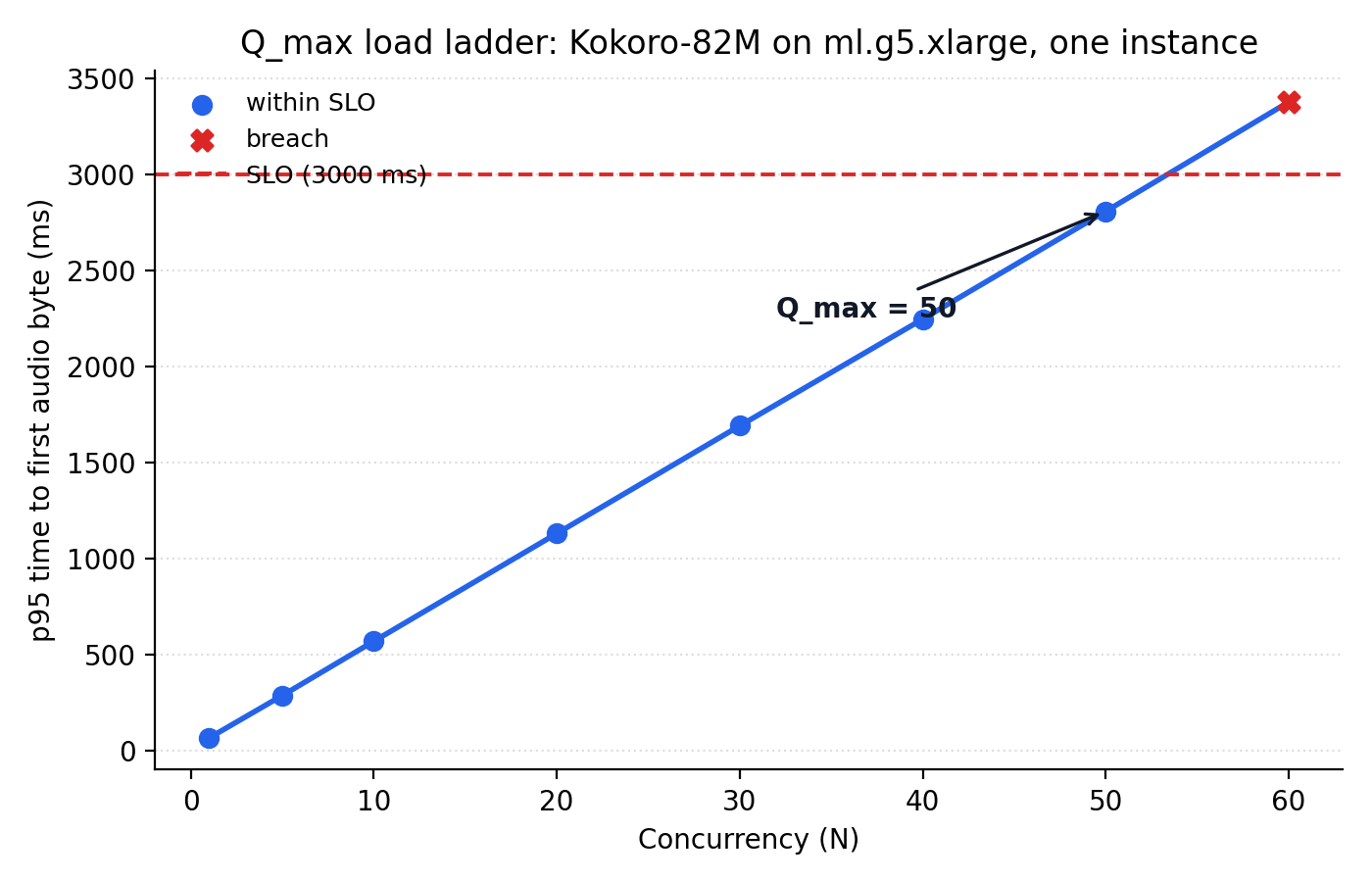
Figure 4: p95 time-to-first-audio-byte against concurrency, with the SLO line and the breach point at concurrency 60
Q_max = 50, and it’s a bracketed result: rung 60 actually crossed the SLO, which makes 50 a real ceiling rather than a lower bound. The same run measured the uncontended service time, the time one request takes with no queueing at all: mean 61.3 ms, p95 66.1 ms. That number drives a second, independent alarm described later in this post.
Step 3: Measure T_total, the real scale-out time
T_total is how long it takes, wall clock, from the moment more capacity is requested to the moment that capacity serves healthy traffic. It’s measured by forcing a scale-out directly, bypassing the deployed policy’s own detection logic, then timestamping every distinguishable stage.
uv run tts-bench ttotal --model kokoro-82m --qmax <qmax-artifact>ttotal requires the qmax artifact as input, since its recovery judgment reads off that ladder’s own measured rungs, and refuses to run against a ladder measured on a different wire transport.
The forced scale-out broke down into eight measured stages:
| Stage | Duration | Share of T_total |
| capacity requested to desired_set | 30.0 s | 9.4% |
| desired_set to instance visible in logs | 180.8 s | 56.5% (dominant) |
| instance visible to container started | 3.7 s | 1.2% |
| container started to framework_init | 0.0 s | 0.0% |
| framework_init to weights_ready | 6.5 s | 2.0% |
| weights_ready to warmup_done | 1.0 s | 0.3% |
| warmup_done to in_service | 20.7 s | 6.5% |
| in_service to traffic recovered | 47.4 s | 14.8% |
| measured total (t_total_s) | 260.2 s | |
| + policy detection lag, bounded (not measured) | 60.0 s | |
| T_total, planned against | 320.2 s |
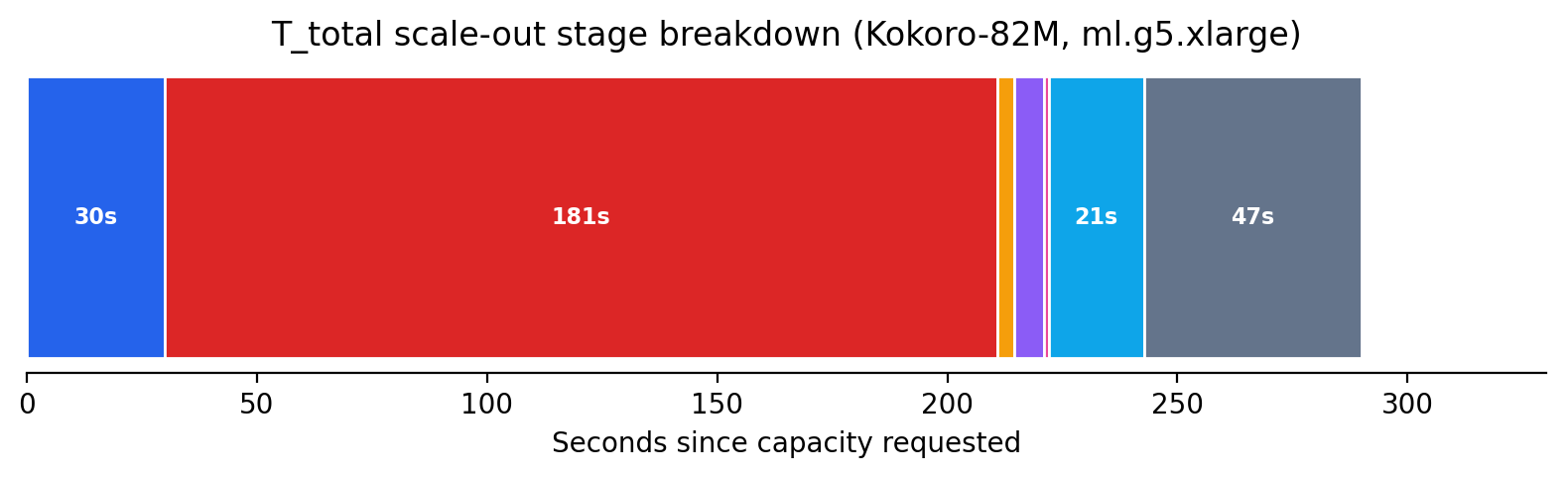
Figure 5: The eight measured stages of a real scale-out, from capacity request to recovered traffic
The dominant stage is Amazon Elastic Compute Cloud (Amazon EC2) instance provisioning plus the container image pull, at 181 seconds, 56 percent of the planned-against total. The highest-impact way to reduce T_total isn’t application code, it’s reducing image size or using warm capacity pools. Everything downstream of “instance visible in logs” is a comparatively small 79 seconds combined.
The 60-second addition on top of the measured 260.2 seconds isn’t measured in this run. It’s bounded from the policy’s own configuration (alarm evaluation period times evaluation periods, plus cooldown), because this run bypassed the policy’s detection logic on purpose to isolate pure provisioning time. plan sizes surge headroom against the full 320.2-second total, because that reaction time is a real part of any production scale-out even though this measurement excluded it.
Step 4: Derive the deployed policy with plan
plan is the only command that never touches AWS. It reads the qmax and ttotal artifacts, combines them with two operator-chosen inputs, an SLO of 3,000 ms p95 TTFAB and a surge ratio of 1.25x (the fleet tolerates traffic growing 25 percent within one scale-out cycle without breaching the SLO), and does the following arithmetic. It then prints a report with a verdict for each finding: ok, warn, or, for a genuinely infeasible plan, stop.
uv run tts-bench plan --qmax <qmax-artifact> --ttotal <ttotal-artifact> --peak-rps 5000The --peak-rps flag (5,000 requests per second here, alongside an assumed trough of 10) sizes the fleet’s instance count. It doesn’t factor into the threshold arithmetic below.
h  = surge_ratio - 1                    = 1.25 - 1 = 0.25

C_scale_max = (1 - h)     x Q_max       = 0.75 x 50   = 37.50
C_scale_min = (1 - 2h)    x Q_max       = 0.50 x 50   = 25.00

W_max = SLO - S_p95                     = 3.000s - 0.066s = 2.934s
C_scale_max is the concurrency at which one more instance is added, below Q_max by the surge fraction h, so the fleet still has queue headroom when it asks for more capacity. C_scale_min is the concurrency at or below which one instance is removed, set at (1 - 2h) of Q_max so scale-in triggers only once load has fallen well below where scale-out would trigger again.
The final deployed configuration, exactly as produced by the tooling:
"kokoro-82m": ModelEndpointConfig(
    model_name="kokoro-82m",
    instance_type="ml.g5.xlarge",
    min_instances=1,             # trough 10 rps; 3 is the smallest safe floor for scale-in
    max_instances=9,             # peak 5000 rps
    scaling_target_value=37.500, # C_scale_max, in Amazon CloudWatch units (ratio measured as 1.0)
    scale_in_threshold=25.000,   # C_scale_min, in Amazon CloudWatch units
    ttfab_slo_ms=3000,
    queue_max_depth=50,          # enforced by the container's own admission gate
    scale_out_cooldown_s=30,     # short: one instance added at a time
    scale_in_cooldown_s=960,     # long: see below
)
The two cooldowns are asymmetric on purpose. Scaling out is cheap to be wrong about: worst case, you paid for one instance you didn’t need for thirty extra seconds. Scaling in isn’t symmetric in cost, since capacity removed and later needed again costs a full T_total (320 seconds) to replace. The scale-in cooldown is set to roughly three times T_total, so a scale-in decision only fires once load has genuinely, sustainedly dropped.
The container’s own admission control separately enforces queue_max_depth=50, equal to Q_max: past that depth, a request is refused immediately with a 503 queue_saturated response rather than left to queue past the point it could meet the SLO. A FirstChunkLatencyP95 alarm, thresholded at 65 ms (the measured p95 service time at concurrency 1), watches service time on an instance already serving, tighter than the end-to-end SLO, which includes queuing.
Two findings from the Kokoro-82M run are worth including, because they’re the tool correctly surfacing a known, accepted trade-off rather than a defect:
surge_survival(warn): HoldingC_scale_max(37.5) againstQ_max(50) puts one instance at 97.4% utilization the moment a scale-out triggers, and a replacement takes a fullT_totalto arrive. The surge ratio reserves extra queue slots, but surviving a real surge is about flow, how fast the queue drains, and there’s little flow headroom left at 97.4 percent utilization.scale_in_safety(warn): Removing one instance from a fleet ofNmultiplies every remaining instance’s concurrency byN / (N-1). Scale-in stays stable only once that ratio holds underC_scale_max / C_scale_min(1.5 here), which requiresN >= 3. With a floor of 1 instance, a scale-in from 2 to 1 lands the survivor at exactlyQ_max, right back at the ceiling that triggers another scale-out. The long cooldown damps this flapping without eliminating it. Raising the floor to 3 would remove it structurally, at the cost of standing capacity during low traffic.
Every qmax or ttotal artifact’s file name encodes the configuration it was measured against, instance type and container image digest condensed into a slug (for example, g5xlarge-8b1b96bc). ttotal and plan both refuse to pair artifacts whose fingerprints disagree. That’s downgradable to a warning with --allow-config-mismatch, but refusal is the default.
Step 5: Confirm the deployed policy with validate
validate is the last command in the chain, and the second one, alongside drift, that never mutates anything. It compares the scaling policy actually deployed against the values in the plan artifact, confirming the two match before you treat the configuration as live.
uv run tts-bench validate --model kokoro-82m --plan <plan-artifact>A clean result confirms scaling_target_value, scale_in_threshold, and both cooldowns on the deployed scalable target match what plan derived. Any mismatch means the deployed policy and the measured plan have drifted apart, and should be resolved before relying on the endpoint’s auto scaling behavior.
Testing and validation
Every qmax, ttotal, and plan artifact referenced in this post is a committed file in the repository, not a one-off local output. The preceding worked example, including every number, is independently reproducible by re-running plan against the two committed measurement files, with zero AWS calls and zero new spend:
$ uv run tts-bench plan --qmax <qmax-artifact> --ttotal <ttotal-artifact> --peak-rps 5000
scaling_target_value : 37.500 (C_scale_max)
scale_in_threshold    : 25.000 (C_scale_min)
surge_survival        : warn
scale_in_safety       : warn
Clean up
To remove the resources created in this walkthrough, tear down the stacks in reverse order with a single command:
uv run speech-infra destroy kokoro-82mspeech-infra destroy removes the Amazon SageMaker AI model, endpoint configuration, endpoint, and any auto scaling or Amazon CloudWatch resources attached to it. It doesn’t empty the Amazon S3 bucket that caches model weights or delete the Amazon ECR repository holding the container image, since both can be shared across models. If you no longer need them, empty and delete the Amazon S3 bucket and remove the Amazon ECR repository manually, since a stored model checkpoint and container image continue to incur small storage charges until removed.
Conclusion
Deploy Kokoro-82M as a custom container on an Amazon SageMaker AI real-time endpoint, and replace guesswork with two measurements taken against the live endpoint: Q_max, the highest concurrency one instance sustains before breaching the SLO, and T_total, how long a real scale-out takes. You derive the scale-out threshold, scale-in threshold, and both cooldowns from those two numbers by arithmetic. Scaling on ConcurrentRequestsPerModel, a native, AWS-published metric, and measuring its unit conversion directly rather than assuming it, is what keeps this configuration tied to real concurrency.
The result is an auto scaling policy where every number traces back to a real measurement against your own endpoint, not an assumption carried over from a different workload shape. That distinction is what turns a config-file guess, one that silently overpays or silently breaches its SLO, into a policy you can defend with a specific concurrency ceiling and a specific scale-out time, both measured, not asserted.
Nothing about this four-number model, SLO and surge ratio chosen, Q_max and T_total measured, the rest derived, is specific to TTS. It generalizes to latency-sensitive, concurrency-bound, real-time Amazon SageMaker AI endpoints. For example, a real-time image-embedding endpoint that holds each request open through a GPU forward pass is bound by the same concurrency ceiling, not by a throughput metric. The same qmax/ttotal/plan chain applies unchanged. The real bottleneck there is concurrent in-flight requests rather than a throughput metric borrowed from a different workload shape. The specific numbers here, Q_max=50 and T_total=320s, are true for Kokoro-82M on ml.g5.xlarge. They will differ for a different model or instance type. The methodology and tooling that produce them don’t. The five-command tool chain, drift, qmax, ttotal, plan, and validate, carries over unchanged to the next model you deploy this way.
Clone the sample repository, then run the five-command chain, drift, qmax, ttotal, plan, and validate, against your own endpoint to produce a measured policy. Review the Amazon SageMaker AI auto scaling documentation to adapt the thresholds to your SLO, and open the SageMaker AI console to watch the policy react to live traffic. If you’d like help building a similar measurement-driven deployment, contact your AWS account team.
About the author

Joseph Cottingham
Joseph is a Machine Learning Engineer with the AWS Generative AI Innovation Center, where he designs and delivers AI systems that move organizations from idea to production. His technical background spans firmware, software, and machine learning, with deep expertise in high-throughput, event-driven architectures that keep AI workloads performant at scale. Joseph focuses on the intersection of state-of-the-art research and operational reality, delivering solutions that materially transform organizations and the systems they operate.
来源:AWS Machine Learning Blog · aws.amazon.com